

Multi-branch home care software runs several branches, registered locations or franchise offices within one platform, applies the same operating rules across all of them, and gives head office a comparable view of how each one is actually performing. The word that matters in that sentence is comparable. Connecting your branches to one system is straightforward. Being able to measure them the same way is the hard part, and it is the part that determines whether group oversight is real or nominal.
Most software conversations at group level focus on consolidation: one login, one database, one supplier. That is worth having, but it solves the smaller half of the problem. The larger half is that a group with six branches does not run one care service. It runs six, each with its own registered manager, its own habits and its own working interpretation of what good looks like. The group is accountable for all of them and can see very little of any of them in a form that stands up to comparison.
What multi-branch home care software needs to do
Five capabilities separate group-ready platforms from single-branch systems stretched to fit:
- Standardised rules applied as defaults across every branch, rather than negotiated locally
- Structural access control, so permission follows branch and region as well as job role
- Consistent auditing applied to every record, so branches are measured the same way rather than reporting on themselves
- Two-level reporting that rolls up to group and drills down to branch, service and individual
- Low-friction growth, so opening a branch is a configuration task rather than a new implementation
This guide is written for the people who own that problem: heads of quality, compliance managers and operations directors in groups and networks, including multi-service providers running several service types under one roof. The rest of this guide covers how to test each one.
The question multi-branch home care software should answer
How would you know today if one of your branches was drifting?
Not failing. Drifting. Care plan reviews slipping from four weeks to seven. Visit notes getting shorter. Medication records with more gaps than they had in March. The kind of decline that does not trigger an incident, does not reach head office, and is entirely visible in the records nobody has time to read.
For most groups the honest answer is that they would find out from an inspection, a complaint, a commissioner, or a family. That is not a missing feature in the usual sense. It is a structural blind spot, and it deepens with every branch added, because each branch reports what it chooses to report, in its own format, on its own timetable. When something goes wrong in branch four, it is usually branch four that decides whether head office hears about it.
Any software assessment at group level should start from that question rather than from a feature list. Ask suppliers how their system would answer it.

Multi-branch is only half of it: multi-service groups have the same blind spot
Branch count is only one version of this problem. Plenty of groups are not primarily multi-branch, they are multi-service: one provider delivering domiciliary care, supported living, complex care, live-in and reablement, sometimes from the same office and often with staff working across more than one.
That is a harder version of the same issue. Each service is recorded differently, judged differently and inspected against different expectations. A supported living note and a reablement note are not the same document and should not be measured as though they were. A system that forces one record format across every service either loses the detail that makes each service work, or produces group reporting that compares things that are not comparable.
So a provider can be entirely single-site and still have no meaningful view across the services it runs. When you assess software, be specific about which version of the problem is yours, and test for it directly. Ask to see how the system handles two different service types side by side, with different assessment formats, different review cycles and different reporting expectations, without collapsing them into one template.
Standardised rules, set once and applied everywhere
The first thing group software should give you is overarching rules that act as defaults across every branch, so process, policy and procedure are standardised rather than negotiated locally.
In practice that means defining centrally:
- Care plan and risk assessment templates
- Review cycles and escalation thresholds
- Task lists and visit expectations by service type
- Audit criteria and compliance dashboards
- Invoice formats, rota rules and travel time assumptions
Branches should be able to add local detail on top of those defaults. What they should not be able to do is quietly redefine them, because the moment a branch invents its own care plan format, that branch has removed itself from group reporting.
The practical benefit shows up when you grow. New branches are set up against rules that already exist, with no separate system, no duplicated infrastructure and no fresh implementation project. Adding a branch should be a configuration task, not a programme of work. That is a fair question to put to any supplier during procurement, and the answer tells you a lot about how the platform was built.

Defined Access Rights, and why it matters more than it sounds
In a single agency, access control is administrative tidiness. In a group it is a requirement, and it deserves proper attention rather than a line on a feature comparison.
Role-based permissions alone are not sufficient at group scale. A system that offers only roles such as administrator, coordinator and carer applies those roles across your whole organisation. What a group needs is permission defined by structure as well as by role: a branch manager sees their branch, a regional manager their region, a group compliance lead everything. Without that, groups end up either giving everyone access to everything or running separate systems per site. Both are poor answers, and one of them is a data protection problem.
Unique IQ’s Defined Access Rights (DAR) is built for this. Permissions can be set by branch, by region, by role and by individual user, so each person sees exactly the part of the organisation they are responsible for and nothing more.
In multi-service organisations the point is sharper still. A supported living team has no legitimate reason to see domiciliary client records, and the data minimisation principle under UK GDPR is not optional. Access separation between services is a compliance requirement, not a preference.
For franchise networks it stops being a convenience altogether. Each office is typically a separate legal entity and its own data controller. Proper access separation is what makes a single shared platform lawful rather than merely convenient. If you run or belong to a network, this is the first thing to test, because it determines whether a shared platform is available to you at all.
Three tests worth running in any demo:
- Log in as a branch coordinator and try to reach a client from another branch. You should not be able to.
- Log in as a regional lead and confirm you see your region and only your region.
- Move a member of staff between branches, or across two service types, and see how much administrative work that takes.
The third test catches systems out. Staff working across branches and services is normal in groups, and a platform that treats either boundary as a hard wall will cost you time every week.

Rules tell every branch what good looks like. Auditing tells you whether they do it
Standardising the rules is half the argument, and it is the half most software conversations stop at. Setting a group-wide care plan template tells every branch what is expected. It does not tell you whether the expectation is being met. Somebody still has to read the records, and at group scale nobody can. Checking sixty carers’ notes by hand is tedious. Checking six hundred is not possible, and everyone operating at that size knows it.
This is where auditing capability becomes the deciding factor rather than a nice addition.
IQ:careaudit, an optional add-on to IQ:caremanager, applies the same standard to every visit note and every MAR chart, in every branch, on the same day. Not a sample, and not one branch’s interpretation of a sample. Risks and issues are flagged as records are created rather than found retrospectively.
The consequence at group level is the important bit: branches become genuinely comparable for the first time, because they are being measured the same way rather than reporting on themselves. A branch whose note quality is slipping shows up as a pattern in the data, not as a judgement call by the person responsible for that branch.
IQ:careassist, also an optional add-on, supports care plan co-authoring, which means plans are written to a consistent standard wherever they are written and whoever writes them. In a group where twelve people across five branches write care plans, that consistency is what makes group quality reporting mean anything.
Taken together: standardised rules make every branch work the same way, and auditing tells you whether they actually do. Assess suppliers on both halves.
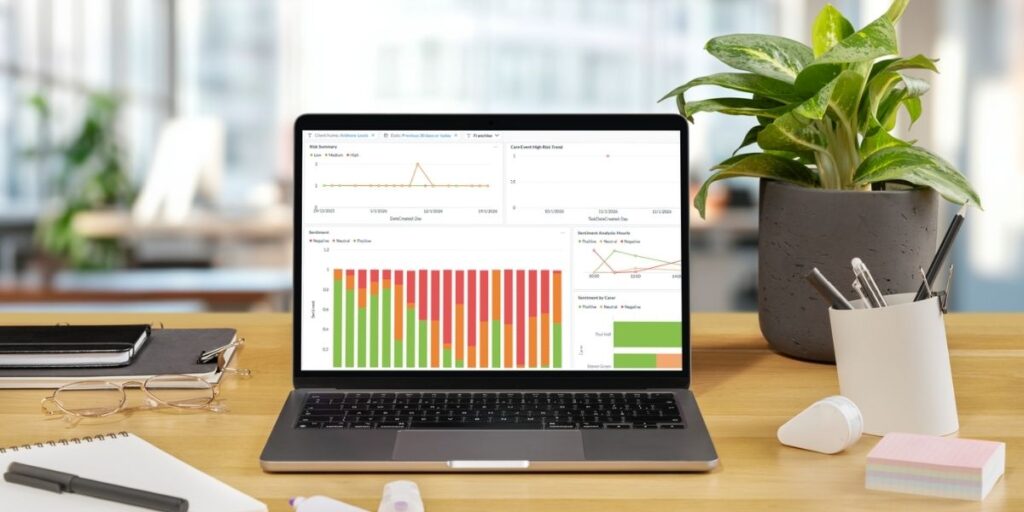
Reporting you can put in front of a commissioner
Group reporting has to serve two audiences with different needs, and a third you may not have considered.
Branch managers need their own numbers, in their own view, without seeing the rest of the group.
The board needs consolidated group figures with the ability to drill down to branch, service and individual in the same system.
Commissioners and inspectors need evidence, separable by registered location, on request. This is the audience that turns compliance into a commercial argument. A rating has real value at group scale: it scores in local authority tenders and supports private fee rates. Being able to evidence, to a commissioner or a board, that you know what is happening across every branch is worth considerably more than being able to produce a monthly summary.
Three capabilities to confirm:
- Group figures roll up without manual consolidation, and every figure drills down
- Branch by branch and service by service comparison is standard, not something you build yourself
- Audit trails identify the branch and the service alongside the user and timestamp, so evidence can be filtered per registered location for individual inspections
That comparison capability is the one most often missing, and it is the expensive one to add later.

Shared staff, shared resources, shared rotas
Two scheduling capabilities matter at group level.
The first is allocating a carer to a visit in a neighbouring branch where geography makes sense. Branch boundaries are administrative. Client postcodes and carer travel routes are not. A system that treats branch as a hard wall forces manual workarounds that undermine your rotas and your travel time accuracy.
The second is conflict detection and travel time calculation that work across the whole group rather than per branch. If two branches can both book the same carer for overlapping visits, you will discover it the difficult way.
Shared resourcing has a workforce dimension too. Being able to see rota pressure, hours and utilisation across the group, rather than branch by branch, means you can spot where staff are under strain before it becomes turnover. Our guide to managing multiple clients in home care software covers the scheduling mechanics in more detail.
Questions to ask multi-branch home care software suppliers
- How would your system tell us if one of our branches was drifting?
- Can permissions be set by branch, region, role and individual user?
- How do you handle separately owned franchise offices as distinct data controllers?
- How does the system handle several different service types without forcing one record format?
- Can we define care plan templates, review cycles and audit criteria centrally?
- Is branch by branch and service by service comparative reporting included as standard?
- Can compliance evidence be filtered by registered location for individual inspections?
- Do you audit every record, or sample?
- Can a carer be scheduled across branch boundaries, with group-wide conflict detection?
- What does opening a new branch involve, practically and commercially?
Question one is the one to lead with, and question eight is the one that separates suppliers most sharply.
Choose against the structure you are building, not the one you have
The most common error in group software selection is buying for today’s org chart. A system that handles three branches comfortably can run out of depth at branch six, usually in the permission model or the reporting layer.
Assess against your three year plan. If you intend to add branches, add service types, or acquire, say so during procurement and ask to see how each of those is handled. It is also worth checking the fundamentals alongside the group-specific requirements, which our guide to must-have home care software features covers, and the Homecare Association publishes useful material for providers operating at scale.
See how it works across a structure like yours
Unique IQ has supported UK home care providers for over two decades, across home care, domiciliary care, supported living and complex care, including multi-branch groups and franchise networks. Our multi-branch care software is built around exactly this problem: IQ:caremanager gives you one set of rules across every branch, with Defined Access Rights built in, and IQ:careaudit, an optional add-on, tells you whether those rules are being followed, in every branch, every day.
Book a demo and bring your branch and service structure with you. We will work through it.

Multi-branch home care software frequently asked questions
What is multi-branch home care software?
Multi-branch home care software runs several branches, registered locations or franchise offices within one platform, applies the same operating rules across all of them, and gives head office a comparable view of each one. The defining capabilities are access control that can be set by branch as well as by role, and auditing that measures every branch the same way rather than relying on branch self-reporting.
How would we know if one of our branches was drifting?
In most groups, you would not know until an inspection, a complaint or a commissioner raised it, because each branch reports on itself in its own format. Detecting drift requires two things: rules defined centrally so every branch is doing the same thing, and auditing applied to every record so you can see whether they are. Comparative branch reporting is what turns that data into an early warning.
Can one system handle multiple CQC registered locations?
Yes. A suitable system should let you configure each registered location separately, filter compliance evidence by location for individual inspections, and still report across the group. Confirm that audit trails identify the branch, not only the user.
What are Defined Access Rights?
Defined Access Rights (DAR) is Unique IQ’s granular access control, allowing permissions to be set by branch, region, role or individual user. Head office can hold group-wide visibility while each branch and each service sees only what it is responsible for. For franchise networks, where each office is usually a separate data controller, that separation is what makes a shared platform lawful rather than simply convenient.
How does multi-branch home care software handle several different service types?
It should allow different record formats, assessment templates and review cycles per service, while still reporting consistently at group level. Domiciliary care, supported living, complex care, live-in and reablement are recorded and inspected differently, so a system that forces one template across all of them will either lose necessary detail or produce comparisons that do not hold up.
Can carers work across more than one branch?
They should be able to. Branch boundaries are administrative and geography often makes cross-branch allocation sensible. Test this in a demo, along with group-wide conflict detection, because some systems treat branch as a hard boundary.
Do franchise networks need different software from directly owned branches?
The operational requirements overlap heavily, but franchise networks need stricter data separation, because each office is typically a separate legal entity and its own data controller. They also need group-level visibility for the franchisor and clarity on data ownership. Raise data controller status explicitly during procurement.
How much does it cost to add a new branch?
This varies by supplier and licensing model. The process matters as much as the price. Adding a branch should be a configuration change against rules that already exist, rather than a new implementation project, so ask what is involved practically as well as commercially.