

In home care, information needs to move fast, and your care staff communication software needs to keep up. A policy update, an urgent reminder, a notice about a new procedure: when something matters, you need every member of your team to know about it, and you need to know they’ve received it.
Why we built Broadcast into our care staff communication software
IQ:messenger was created on the principle that care is a conversation. Real two-way home care team communication, not one-way notifications, is what makes it genuinely useful for the way care teams work.
But we also heard a clear message from our customers: sometimes you need to reach everyone at once. A regulatory update. A change in working patterns. A reminder ahead of an inspection. In those moments, sending the same message to dozens, or hundreds, of carers individually isn’t practical, and using personal channels like WhatsApp introduces compliance and safeguarding risks you don’t want.
Broadcast solves that problem, without compromising on the security, traceability, and two-way capability that make IQ:messenger fit for care.
How Broadcast works
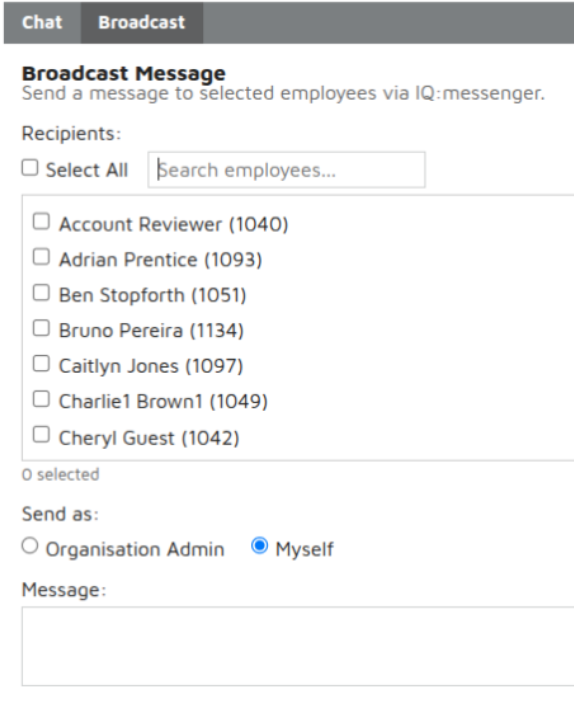
From the new Broadcast tab inside IQ:messenger, you can:
- Select your recipients. Choose individual carers, multiple carers, or hit Select All to reach the whole team. There’s a search bar to find people quickly, and a running count of how many you’ve selected.
- Choose how to send it. Pick between sending as Organisation Admin or sending as yourself.
- Type your message. Up to 4,096 characters, so you’ve got plenty of room to be clear.
- Send.
That’s it. Your team gets the message instantly, inside the same secure platform they’re already using for visit notes, scheduling and care delivery.
Read-only or two-way? You choose
This is where Broadcast gets clever. You decide how the message behaves based on the option you pick.
Send as Organisation Admin: The message goes out as read-only. Recipients can see it, but they can’t reply. This is ideal for formal notices, compliance updates, or any communication where you need the message to land without generating a flood of replies. Think of it as the digital equivalent of a posted notice, but instant and traceable.
Send as Myself: The message comes from you personally, and recipients can reply. Replies arrive in your usual private conversations, so the dialogue is one-to-one, not a noisy group chat. This is perfect when you want to start a conversation, check in, or open the door for follow-up questions.
Two modes, one feature, designed around how care teams actually communicate.
A safer alternative to WhatsApp for care teams
If your office team is still using WhatsApp groups to coordinate with carers, you’re not alone. Plenty of home care providers started there because it was familiar and free. But informal messaging apps weren’t built for regulated care environments, and the risks are growing.
Personal devices, shared groups, mixed work and family chats, no audit trail, no central oversight. If a carer leaves, the messages stay on their personal phone. If something gets shared in the wrong group, you’ve potentially got a data breach. And when CQC asks how you communicate sensitive information, “we use WhatsApp” isn’t an answer that holds up.
A purpose-built WhatsApp alternative for care providers means encrypted messaging, full audit trails, and a clear separation between work and personal life. Carers stay reachable, but on their own terms, and everything sits inside the same secure system you use for scheduling, visit notes, and care planning.
Full Broadcast history, every time
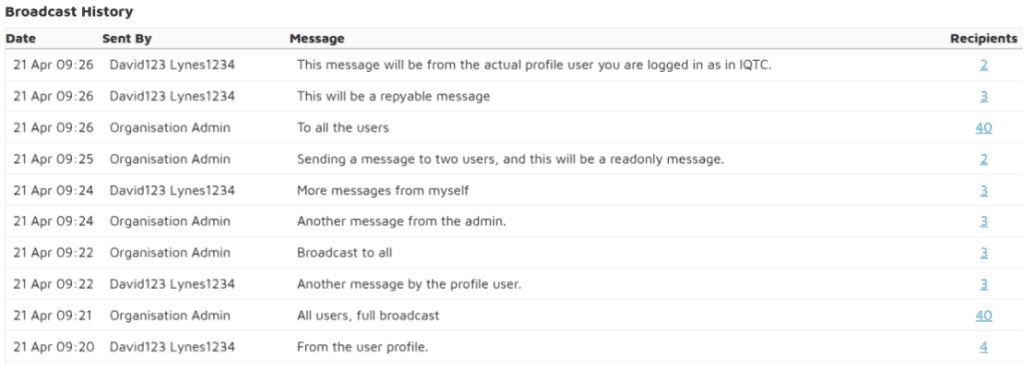
Every Broadcast you send is logged in your Broadcast History. You’ll see:
- The date and time the message was sent
- Who sent it
- The full message content
- The number of recipients
Click the recipient count and you’ll see exactly who received it. No guesswork, no gaps, just a clear, auditable record of what was communicated and to whom.
For care providers managing CQC compliance, internal governance, or multi-branch oversight, this kind of CQC-compliant staff messaging matters. You can demonstrate exactly when staff were informed, of what, and by whom.
Why this matters for care staff communication
Bulk messaging for care teams isn’t just a convenience feature. It’s a compliance tool, a coordination tool, and a way to protect carer wellbeing all at once.
Compliance: Sending updates through IQ:messenger means everything stays inside your secure, encrypted platform. No personal WhatsApp groups, no risk of sensitive information ending up in the wrong place. Secure messaging for carers is no longer a nice-to-have, it’s a regulatory expectation.
Coordination: When something needs to reach everyone, fast, you’ve got a reliable way to do it. No wondering whether the message got through.
Wellbeing: Carers keep work and personal life separate. Important updates land in their work app, not on their family group chat at 9pm.
Available now
Broadcast is live in IQ:messenger, our care staff communication software, today. If you’d like a walkthrough, or you want to see how it could fit into your communication strategy, get in touch with our team.
We’re always shaping IQ:messenger around what care providers actually need. Broadcast came directly from customer feedback, and it won’t be the last update of its kind.
Want to see IQ:messenger with our new Broadcast feature in action? Book a quick walkthrough or contact us to learn more.